


Get to know Linktree’s Audience Manager, your all-in-one CRM and the key to growing your audience as a creator or brand.
Get to know Linktree’s Audience Manager, your all-in-one CRM and the key to growing your audience as a creator or brand.
Traditional customer relationship management tools (CRMs) can be prohibitive, especially if you’re a creator or small business owner. They’re costly, often require juggling multiple tools, and carry a steep learning curve for those unfamiliar with data management.
To bridge the gap between collecting leads and using their data to master your marketing, Linktree has released Audience Manager.
It’s an all-in-one CRM embedded within Linktree that’s packed with features to help Linkers grow their audiences. You can capture new leads, build connections, improve engagement and convert leads to dedicated customers, all from your Audience Manager dashboard.
If you’re looking for a seamless way to grow your audience, whilst keeping all the power in your hands, Audience Manager is the solution. Here’s how to get the most out of it.
Linktree’s Audience Manager is a centralized CRM where Linkers can collect, manage and market to subscribers. There are tons of ways to use it to your advantage, whether you’re a creator, a new brand or a business owner.
Many Linkers are already capturing new leads from various sources, including Linktree Forms, Digital Downloads, courses and gated content. Audience Manager provides an easy way to keep and manage all this data in one place.
Unlike standalone CRMs, Audience Manager natively integrates with all the lead capture tools available on Linktree.
This means you don’t need to export your leads to a separate system right away. Instead, you can tag subscribers there and then and implement new digital marketing strategies without leaving Linktree. Less time spent doing manual tasks, more time focusing on accelerating your growth.
Trying to keep track of leads acquired from various platforms or sources can be challenging, but when you use Linktree to grow your audience, the process becomes super simple.
Within Linktree, you’ll find a range of smart tools that encourage better engagements, connections and conversions from your audience.
These include Linktree Forms to capture data, subscriber-only features to encourage paid interactions and Digital Downloads to use as lead magnets. Linktree’s Courses tool, in partnership with Kajabi, even lets you build and sell your own course right from your Linktree.

By centralizing not just your lead management but also your lead capture, you’re increasing your efficiency and freeing up valuable time for your brand or business.
No two customers think or act in exactly the same way, meaning you need to deliver different messages to different audience groups with shared interests. That’s where segmentation comes in.
When you use Linktree’s Audience Manager, you can easily organize and categorize your audience using custom tags. This puts the power to diversify your communications in your hands.
Instead of sending the same email to your entire database, use segments to split out key messages based on behaviors, interests or customer journey phases.
By tailoring your communications, you’ll pave the way for better engagement (think improved click-through and open rates), stronger connections with your customers and, if all goes well, more conversions.
Save yourself the time and effort of wrangling data day-to-day by leaning on one of Linktree’s third party integrations.
Using Audience Manager, you can integrate your Linktree with Mailchimp, Klaviyo, Kit or Google Sheets, which eliminates the need to export and import data back and forth.
This further simplifies the data management process, and means you can implement tags and segmentations within Linktree that will automatically synchronize with your chosen integration.
If your go-to program isn’t on our list, don’t worry! Like any good CRM, Linktree’s Audience Manager also makes it easy to export your data as a CSV file and import it into any other programs you’re using to fuel your marketing efforts.
No need for a separate analytics tool – you’ll find everything you need to test, analyze and iterate your marketing communications within Linktree’s Audience Manager.
From your Audience dashboard, you can see the performance of all your Links, including how many clicks you’re receiving, who’s filling out your forms and where people are finding you.
This is key to understanding your audience: without data, you’re in the dark about what works and what doesn’t. Then, when you see patterns or high performers emerging, you can adjust your strategy accordingly.
Split out your data by campaign, engagement type, interests and more to make it easier to give your audience exactly what they want.
To get the most value out of Audience Manager, you need to build your mailing list and gather the data needed to own your audience. Let’s dive into a few of Linktree’s best growth tools to try.
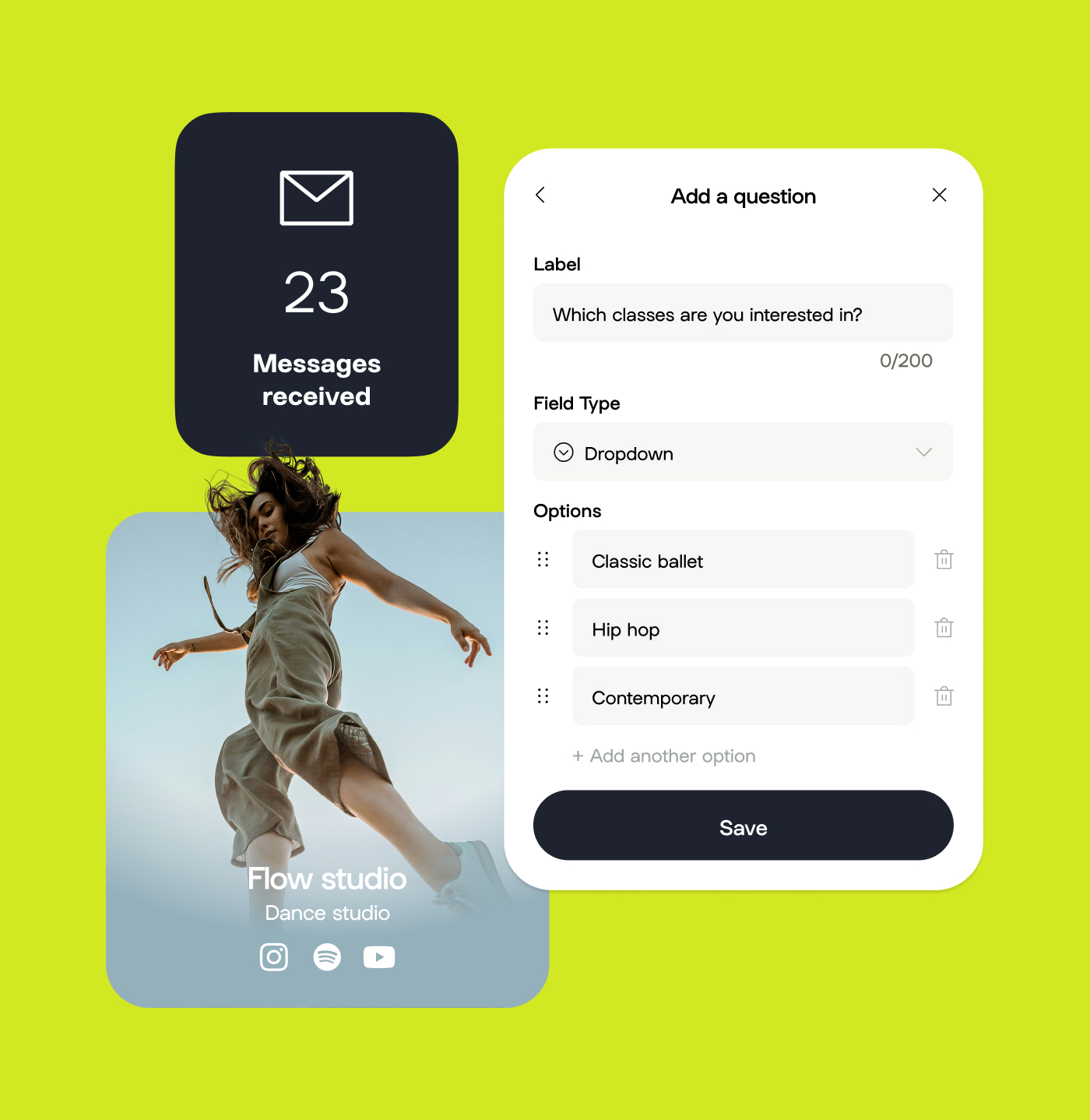
Create your own customizable contact forms and share them with your audience using forms. This is the critical first point of your lead capture strategy, and the secret to owning your audience by collecting valuable first-party data.
Set up your Linktree Form using these steps:

Want to offer your audience something valuable in exchange for their info? Digital Downloads can help you do it, whether it’s for free as a lead magnet or at a cost to drive revenue. Sell your products right from within your Linktree, then manage that data in the back-end using Audience Manager.

Courses are a high-ticket offering that requires some work to create, but pay off in spades. If you’re thinking about building a course, do it using Linktree Courses, powered by Kajabi. You won’t have to leave the Linktree platform, and you’ll have immediate access to all the customer data you collect from participants.
Ready to launch your own Linktree Course? Get inspiration from creators who are already driving engagement and revenue from this feature.
Drive subscriptions and provide exclusive gated content using Audience Manager’s subscriber-only tools. Lock Links so only subscribers can access them, or display an exclusive subscriber-only discount code to an affiliate or owned product. Then, use Audience Manager’s built-in analytics to ensure it’s working as intended.
Try Linktree’s Audience Manager (available on Pro or Premium plans). Compared to traditional CRMs, Audience Manager comes at an affordable price point that’s perfect for creators, new brands and small businesses. Plus, it’s easy to use and embedded within your existing Linktree.
Get started with Audience Manager today.
{{general="/s/internal/style-guide/components"}}

Is posting on TikTok really as lucrative as it seems? We’ve done the research: here’s what you need to know about earning money on TikTok in 2026.
Curate a safe, positive digital experience by learning how to block a hashtag on TikTok using the platform’s content filters.
A hashtag generator is one of the best Instagram growth tools around. See what the hype is about and learn how to use Linktree’s Hashtag Generator for better reach and engagement on Instagram.


